


Showing posts with label sql. Show all posts
Showing posts with label sql. Show all posts
Pakistan website hacked by Team NUTS
Team NUTS one of the India's popular hackers group has hacked a Pakistan website. Team NUTS has also striked on many other pakistan websites. This time NUTS has hacked on an Indian website for security issues

http://attack-h.org/attack/?id=33609
 The content on Hacking Beast like Hacking Articles, Cyber News etc are provided by many sources ( email,messages,internet etc) , we do not take any responsibility of your activities. The news provided by us on this site is gathered from various sources. if any person have some FAQ's in their mind they can Contact Us. and you can also read our Disclamier for more info. Thank You !
 If you enjoyed Hacking Beast Articles , Make sure you subscribe to our RSS feed. Stay Updated about latest Hacking News, Tips and Tricks,and Cyber News.! and recieve all our emails and latest posts directly in your inbox to enjoy fast and easy reading . Thank You!

Hacked site and Mirror link :-
http://rehmatsurgical.com/http://attack-h.org/attack/?id=33609
The content on Hacking Beast like Hacking Articles, Cyber News etc are provided by many sources ( email,messages,internet etc) , we do not take any responsibility of your activities. The news provided by us on this site is gathered from various sources. if any person have some FAQ's in their mind they can Contact Us. and you can also read our Disclamier for more info. Thank You !If you enjoyed Hacking Beast Articles , Make sure you subscribe to our RSS feed. Stay Updated about latest Hacking News, Tips and Tricks,and Cyber News.! and recieve all our emails and latest posts directly in your inbox to enjoy fast and easy reading . Thank You!Upload backdoor in joomal 1.5
What you need ?
1. You must have an administrator access for any joomla website, find your own vulnerable target, inject it, crack the password and then login to the joomla administrator
2. The target must be 1.5.x version ( but its also work on 1.6.x, try it up :p )
3. You need my cracking modules who can download at the link bellow ( shell has been include on the modules package )
4. Ready to uploading backdoor !!!!
How to prepare and make your own cracking modules ?
1. Download any joomla modules form legal vendor and extract it
2 For example i use mod_spo_1.5.16.zip
Credit to :
* Author: Omar Muhammad
* Email: admin@omar84.com
* Website: http://omar84.com
* Module: Simple Page Options
* Version: 1.5.16
* Date: 7/2/2010
This module is free, thanks mr.omar :):):)
3. Extract the package module and edit setup .XML ( look at the picture bellow )
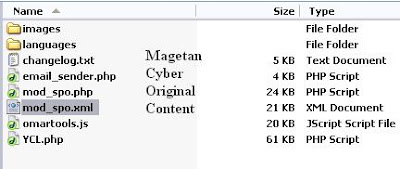
Joomla modules always have a setup file on the XML format, you can find it in the package file, open this file with notepad ++ or dreamweaver and edit some code line.
4. Then look at this line bellow:
===========================================
<files>
<filename module="mod_spo">mod_spo.php</filename>
<filename>omartools.js</filename>
<filename>YCL.php</filename>
<filename>email_sender.php</filename>
<filename>images/favs.png</filename>
<filename>images/home.png</filename>
<filename>images/page.png</filename>
<filename>images/print.png</filename>
<filename>images/share.png</filename>
<filename>images/pdf.png</filename>
<filename>images/top.png</filename>
<filename>images/email.png</filename>
<filename>images/contact.png</filename>
<filename>images/po_title.png</filename>
<filename>images/po_title_ie.png</filename>
<filename>images/po_close.png</filename>
<filename>images/po_close_ie.png</filename>
<filename>images/blogger.png</filename>
<filename>images/del.png</filename>
<filename>images/digg.png</filename>
<filename>images/diigo.png</filename>
<filename>images/facebook.png</filename>
<filename>images/furl.png</filename>
<filename>images/google.png</filename>
<filename>images/live.png</filename>
<filename>images/mixx.png</filename>
<filename>images/myspace.png</filename>
<filename>images/reddit.png</filename>
<filename>images/spinner.gif</filename>
<filename>images/stumble.png</filename>
<filename>images/twitter.png</filename>
<filename>images/ybuzz.png</filename>
<filename>images/firefox.png</filename>
<filename>images/flock.png</filename>
<filename>images/chrome.png</filename>
<filename>images/opera.png</filename>
<filename>images/safari.png</filename>
<filename>images/iexp.png</filename>
<filename>languages/arabic.php</filename>
<filename>languages/brazilian_portuguese.php</filename>
<filename>languages/czech.php</filename>
<filename>languages/dutch.php</filename>
<filename>languages/english.php</filename>
<filename>languages/finnish.php</filename>
<filename>languages/french.php</filename>
<filename>languages/german.php</filename>
<filename>languages/greek.php</filename>
<filename>languages/hungarian.php</filename>
<filename>languages/italian.php</filename>
<filename>languages/norwegian.php</filename>
<filename>languages/polish.php</filename>
<filename>languages/romanian.php</filename>
<filename>languages/russian.php</filename>
<filename>languages/serbian.php</filename>
<filename>languages/spanish.php</filename>
<filename>languages/swedish.php</filename>
<filename>languages/turkish.php</filename>
<filename>languages/ukrainian.php</filename>
</files>
==============================================
Thats a list of file who will uploaded to [modules] directory, all of file must be setting up here, the red line will describe my shell file ( YCL.php ). Include your own shell name there and save the xml.
5. Package all of modules file into .zip format
6. Ready to upload :):):)
How to upload ????
1. Login into your administrator page ( for example i use www.ccvmotogarage.com hihihihihi )
2. Select menu Extension >> Install/Uninstall
3. Browse your modules package and click Upload and Install button ( Wait in the few time and call url for the test )


The content on Hacking Beast like Hacking Articles, Cyber News etc are provided by many sources ( email,messages,internet etc) , we do not take any responsibility of your activities. The news provided by us on this site is gathered from various sources. if any person have some FAQ's in their mind they can Contact Us. and you can also read our Disclamier for more info. Thank You !If you enjoyed Hacking Beast Articles , Make sure you subscribe to our RSS feed. Stay Updated about latest Hacking News, Tips and Tricks,and Cyber News.! and recieve all our emails and latest posts directly in your inbox to enjoy fast and easy reading . Thank You!
1. You must have an administrator access for any joomla website, find your own vulnerable target, inject it, crack the password and then login to the joomla administrator
2. The target must be 1.5.x version ( but its also work on 1.6.x, try it up :p )
3. You need my cracking modules who can download at the link bellow ( shell has been include on the modules package )
4. Ready to uploading backdoor !!!!
How to prepare and make your own cracking modules ?
1. Download any joomla modules form legal vendor and extract it
2 For example i use mod_spo_1.5.16.zip
Credit to :
* Author: Omar Muhammad
* Email: admin@omar84.com
* Website: http://omar84.com
* Module: Simple Page Options
* Version: 1.5.16
* Date: 7/2/2010
This module is free, thanks mr.omar :):):)
3. Extract the package module and edit setup .XML ( look at the picture bellow )

Joomla modules always have a setup file on the XML format, you can find it in the package file, open this file with notepad ++ or dreamweaver and edit some code line.
4. Then look at this line bellow:
===========================================
<files>
<filename module="mod_spo">mod_spo.php</filename>
<filename>omartools.js</filename>
<filename>YCL.php</filename>
<filename>email_sender.php</filename>
<filename>images/favs.png</filename>
<filename>images/home.png</filename>
<filename>images/page.png</filename>
<filename>images/print.png</filename>
<filename>images/share.png</filename>
<filename>images/pdf.png</filename>
<filename>images/top.png</filename>
<filename>images/email.png</filename>
<filename>images/contact.png</filename>
<filename>images/po_title.png</filename>
<filename>images/po_title_ie.png</filename>
<filename>images/po_close.png</filename>
<filename>images/po_close_ie.png</filename>
<filename>images/blogger.png</filename>
<filename>images/del.png</filename>
<filename>images/digg.png</filename>
<filename>images/diigo.png</filename>
<filename>images/facebook.png</filename>
<filename>images/furl.png</filename>
<filename>images/google.png</filename>
<filename>images/live.png</filename>
<filename>images/mixx.png</filename>
<filename>images/myspace.png</filename>
<filename>images/reddit.png</filename>
<filename>images/spinner.gif</filename>
<filename>images/stumble.png</filename>
<filename>images/twitter.png</filename>
<filename>images/ybuzz.png</filename>
<filename>images/firefox.png</filename>
<filename>images/flock.png</filename>
<filename>images/chrome.png</filename>
<filename>images/opera.png</filename>
<filename>images/safari.png</filename>
<filename>images/iexp.png</filename>
<filename>languages/arabic.php</filename>
<filename>languages/brazilian_portuguese.php</filename>
<filename>languages/czech.php</filename>
<filename>languages/dutch.php</filename>
<filename>languages/english.php</filename>
<filename>languages/finnish.php</filename>
<filename>languages/french.php</filename>
<filename>languages/german.php</filename>
<filename>languages/greek.php</filename>
<filename>languages/hungarian.php</filename>
<filename>languages/italian.php</filename>
<filename>languages/norwegian.php</filename>
<filename>languages/polish.php</filename>
<filename>languages/romanian.php</filename>
<filename>languages/russian.php</filename>
<filename>languages/serbian.php</filename>
<filename>languages/spanish.php</filename>
<filename>languages/swedish.php</filename>
<filename>languages/turkish.php</filename>
<filename>languages/ukrainian.php</filename>
</files>
==============================================
Thats a list of file who will uploaded to [modules] directory, all of file must be setting up here, the red line will describe my shell file ( YCL.php ). Include your own shell name there and save the xml.
5. Package all of modules file into .zip format
6. Ready to upload :):):)
How to upload ????
1. Login into your administrator page ( for example i use www.ccvmotogarage.com hihihihihi )
2. Select menu Extension >> Install/Uninstall
3. Browse your modules package and click Upload and Install button ( Wait in the few time and call url for the test )

4. You can find your shell here www.your-target/modules/mod_spo/shell.php
5. When you found your shell interface on the browser, mean you have successfully uploading backdoor :):):)
Okay, you can view my sample backdoor here , but if someday you got brokenlink, you can see the example capture at the picture bellow
5. When you found your shell interface on the browser, mean you have successfully uploading backdoor :):):)
Okay, you can view my sample backdoor here , but if someday you got brokenlink, you can see the example capture at the picture bellow
 The content on Hacking Beast like Hacking Articles, Cyber News etc are provided by many sources ( email,messages,internet etc) , we do not take any responsibility of your activities. The news provided by us on this site is gathered from various sources. if any person have some FAQ's in their mind they can Contact Us. and you can also read our Disclamier for more info. Thank You !If you enjoyed Hacking Beast Articles , Make sure you subscribe to our RSS feed. Stay Updated about latest Hacking News, Tips and Tricks,and Cyber News.! and recieve all our emails and latest posts directly in your inbox to enjoy fast and easy reading . Thank You!
Nokia forum got hacked by pr0tect0r AKA mrNRG

Nokia a world famous brand for mobile phones . Toady the forum of NOKIA got hacked by a hacker code name "pr0tect0r AKA mrNRG" . He has hacked the forum and has added his small message " owned by pr0tect0r AKA mrNRG " . Hacking Beast is presenting this hack exclusively see the screen shot below

Hacked page link : http://www.developer.nokia.com/Community/Discussion/faq.php?cd
 The content on Hacking Beast like Hacking Articles, Cyber News etc are provided by many sources ( email,messages,internet etc) , we do not take any responsibility of your activities. The news provided by us on this site is gathered from various sources. if any person have some FAQ's in their mind they can Contact Us. and you can also read our Disclamier for more info. Thank You !If you enjoyed Hacking Beast Articles , Make sure you subscribe to our RSS feed. Stay Updated about latest Hacking News, Tips and Tricks,and Cyber News.! and recieve all our emails and latest posts directly in your inbox to enjoy fast and easy reading . Thank You!
Protecting System Information with Syskey !
 EFS protects files on the hard disk against attack, but the storage location of the private keys for the EFS-protected files presents unique challenges for the system administrator.EFS files are encrypted with a FEK that is itself encrypted with the user's public key. The user must possess the corresponding private key to decrypt that data. During normal operation, that private key must obviously be stored somewhere on the hard drive? if it were stored only in protected volatile memory, EFS files would not be accessionce a computer was restarted.
The location of a user's private keys is not a big secret, although it is obfuscated to keep casual attackers away. The keys are stored in a protected key store database. These keys are all protected by a single key called a master key. Other keys used by the system for various cryptographic operations, called protection keys, are also stored in a similar fashion.
Because an attacker who is able to obtain the master key for that account can decrypt the stored private keys, it must be protected. To counter this type of attack, Microsoft provides a utility called Syskey.
How Syskey Works
Syskey utility simply encrypts the private key store and the SAM using a 128-bit symmetric key called the system key, or syskey. The syskey must be read into system memory during boot to decrypt the SAM and private key store to allow the operating system to start. Without this information, the operating system itself cannot start and will fail. This is a minor benefit, as failure to boot may thwart lightweight attackers. Syskey also prevents offline attackers from copying the SAM and using brute force attacks against stored passwords.
Configure Windows System Key Protection
To Configure Windows System Key Protection, follow these steps:
- At a command prompt, type syskey, and then press ENTER.
- In the Securing the Windows Account Database dialog box, note that the Encryption Enabled option is selected and is the only option available. When this option is selected, Windows will always encrypt the SAM database.
- Click Update.
- Click Password Startup if you want to require a password to start Windows. Use a complex password that contains a combination of upper case and lower case letters, numbers, and symbols. The startup password must be at least 12 characters long and can be up to 128 characters long.
Note If you must remotely restart a computer that requires a password (if you use the Password Startup option), a person must be at the local console during the restart. Use this option only if a trusted security administrator will be available to type the Startup password. - Click System Generated Password if you do not want to require a startup password.
Select either of the following options:- Click Store Startup Key on Floppy Disk to store the system startup password on a floppy disk. This requires that someone insert the floppy disk to start the operating system.
- Click Store Startup Key Locally to store the encryption key on the hard disk of the local computer. This is the default option.
Remove the SAM encryption key from the local hard disk by using the Store Startup Key on Floppy Disk option for optimum security. This provides the highest level of protection for the SAM database.
Always create a back-up floppy disk if you use the Store Startup Key on Floppy Disk option. You can restart the system remotely if someone is available to insert the floppy disk into the computer when it restarts.

 The content on Hacking Beast like Hacking Articles, Cyber News etc are provided by many sources ( email,messages,internet etc) , we do not take any responsibility of your activities. The news provided by us on this site is gathered from various sources. if any person have some FAQ's in their mind they can Contact Us. and you can also read our Disclamier for more info. Thank You !If you enjoyed Hacking Beast Articles , Make sure you subscribe to our RSS feed. Stay Updated about latest Hacking News, Tips and Tricks,and Cyber News.! and recieve all our emails and latest posts directly in your inbox to enjoy fast and easy reading . Thank You!
Idea Cellular Web Portal Hacked, Customers Info exposed !
zSecure Team has found a critical Sql vulnerability in a high profile web portal. Ideacellular web portal which compromises the entire site database. The hacker has got access to the full Database of the website and all users information is in the hand of the hacker
Website Attacked on : http://www.ideacellular.com
Attack Type : Hidden SQL Injection Vulnerability
Db type :MySql 5.0.27


The content on Hacking Beast like Hacking Articles, Cyber News etc are provided by many sources ( email,messages,internet etc) , we do not take any responsibility of your activities. The news provided by us on this site is gathered from various sources. if any person have some FAQ's in their mind they can Contact Us. and you can also read our Disclamier for more info.Thank You !If you enjoyed Hacking Beast Articles , Make sure you subscribe to our RSS feed. Stay Updated about latest Hacking News, Tips and Tricks,and Cyber News.! and recieve all our emails and latest posts directly in your inbox to enjoy fast and easy reading . Thank You!
Website Attacked on : http://www.ideacellular.com
Attack Type : Hidden SQL Injection Vulnerability
Db type :MySql 5.0.27
Proof provided by hacker for this vulnerability


The content on Hacking Beast like Hacking Articles, Cyber News etc are provided by many sources ( email,messages,internet etc) , we do not take any responsibility of your activities. The news provided by us on this site is gathered from various sources. if any person have some FAQ's in their mind they can Contact Us. and you can also read our Disclamier for more info.Thank You !
If you enjoyed Hacking Beast Articles , Make sure you subscribe to our RSS feed. Stay Updated about latest Hacking News, Tips and Tricks,and Cyber News.! and recieve all our emails and latest posts directly in your inbox to enjoy fast and easy reading . Thank You!Mini PHP Shell 27.9 V2 Released

According to Developer jos_ali_joe and [Devilzc0de] "This is a continuation of PHP Shell Mini 27.9 V1 , Editing Shell c99 and new tools ".
Features : Encoder , Processes , FTP-Brute-Forcer , Server-Information , SQL-Manager and etc.
Download : http://www.megaupload.com/?d=DRHS3AV9
This tool may have backdoor so download it carefully and turn your antivirus off
The content on Hacking Beast like Hacking Articles, Cyber News etc are provided by many sources ( email,messages,internet etc) , we do not take any responsibility of your activities. The news provided by us on this site is gathered from various sources. if any person have some FAQ's in their mind they can Contact Us. and you can also read our Disclamier for more info. Thank You !If you enjoyed Hacking Beast Articles , Make sure you subscribe to our RSS feed. Stay Updated about latest Hacking News, Tips and Tricks,and Cyber News.! and recieve all our emails and latest posts directly in your inbox to enjoy fast and easy reading . Thank You!